
Bitnami servers come with Apache and WordPress SSL enabled with a self signed certificate. I will address replacing this certificate in a later post.
As I understand it Bitnami configures the AWS cloud image so that the application configuration overwrites the Apache configuration. This is described in their documentation.
The relevant section is

This will not work because it is overwritten by the WordPress configuration as highlighted. Instead you must follow these instructions,
Recent versions of BitNami apps ship three configuration files in the “/installdir/apps/myapp/conf/“ folder: httpd-app.conf, httpd-prefix.conf and httpd-vhosts.conf.
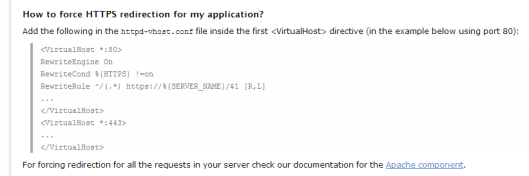
After making the required change to the application configuration file you must restart the server.
$ sudo /opt/bitnami/ctlscript.sh restart apache
 Dr James Bayley
4 responses to “How to enforce SSL on a Bitnami WordPress server”
[…] a previous post I described how to enforce SSL in this post I show how to replace the self-signed certificate with one from a Certificate […]
I agree that this is a bug with Bitnami’s documentation and their prescribed method will not work. The app’s vhosts configuration file doesn’t seem to be called from the Apache configuration files. Does it need to be included at some point in the bitnami.conf file?
Dear Christopher,
It is some time since I did this and my brain hurts. However I did explain how each of the files is called in this post.
* https://blog.jamesbayley.com/2014/04/04/creating-a-wordpress-farm-on-a-bitnami-server/
I hope that this helps.
James
[…] only added the three “Rewrite” rules. If you need help, refer to this blog article. If you need help with vi, look […]