

I have got my home broadband from PlusNet for over 20 years who have given me excellent service over that time. The original connection was over the BT copper line to the house (5MB max) and in recent years this was upgraded to Fibre to the Cabinet (~60MB). In the last couple of years Virgin Media have installed a cable outside my house so I took advantage of a Black Friday deal to move to Virgin Media and scheduled a termination with PlusNet. Unfortunately Virgin Media moved my install date by two weeks and although I told PlusNet due an human error they disconnected me anyway. I was left with no Internet and not much certainty of when I would get it again. The PlusNet team offered me a £30 rebate to go and buy a mobile internet dongle (modem).
PlusNet routers don’t support mobile modems
Unsurprisingly the PlusNet team don’t understand mobile internet.
- It costs much more than £30 for a months’ service and the hardware.
- PlusNet routers do not support mobile dongles
I think that these issues will be common across home broadband providers because their job is to sell wired connections.
Amazon to the rescue
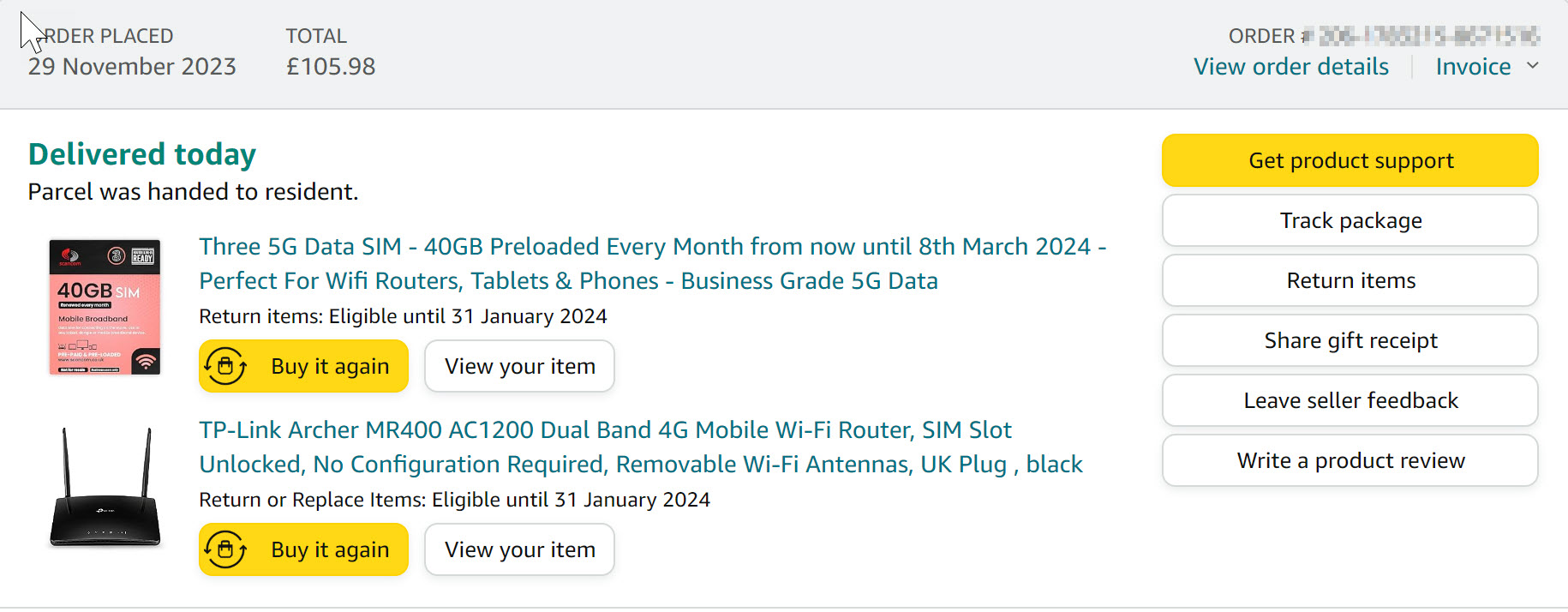
- Data only SIM (Anyone can buy this SIM but it is marked for commercial use only and I have bought it for my business.)
- TP-Link 4G router
I wanted fast delivery so I signed up to Amazon Prime (free cancellation within 30 days) and got everything by 10am the next day.
It worked
I have a wired home network with the network cabinet under the stairs and a single CAT4 cable to connect to the router.
- I put the SIM card in the router
- I turned it on.
- It connected to the Internet
- I connected my home network to the LAN port
- It worked!
I am and remain completely amazed 40 years of working in IT did not prepare me for this.
Speed

The speed I am getting is about half what I got from ‘fibre to the cabinet’ but it is fine for everyday use. The latency is very good and my Windows PC seems snappier perhaps because in this new cloud first world all every app is pinging a server all the time.
Wireless
I have a wireless network for our phones and devices. I just changed the wireless network name and password on the TP-Link router to the one I used before and all the devices simply reconnected – nice.
TP-Link Router Review
I have always found TP-Link to be a reliable manufacturer. The hardware and firmware is good quality and easy to use. An excellent choice.
Conserving Bandwidth
I have chosen to use a SIM that is preloaded with 40GB of data a month. The network settings panel in my Windows PC indicates that I use about 30GB a month. I checked the data use of the apps listed and ensured that unnecessary apps did not start at start-up.
I can log into the router and see daily bandwidth use. I will tell the kids that they can’t watch movies but YouTube is OK and we will see how it goes. My guess is that 40GB will be fine.
The TP-Link has some basic parental controls so if necessary I can always block YouTube etc but if you have complex requirements then you will either need to be skilled in network configuration or find an alternative solution.
4G or 5G?
5G hardware is still more expensive than 4G hardware and although it promises 5x greater download speeds that does not matter to most people. If you are streaming one or two movies then 30MB/s is fine.
The great thing is that 5G SIMS work in 4G equipment. ‘5G’ just means that the SIM can use 5G if it is available.
Reliability
It is very difficult to predict the reliability of my new 4G connection. I have a strong signal in the house and I live in London so I predict that it will be very good. Only time will tell.
In terms of intrinsic reliability the order is,
- Best – cable or fibre to the premises
- Standard – Fibre to the cabinet and copper to the house (the old BT line)
- 4G/5G
However, as individuals we are interested in the reliability of the connection to our house. It is quite possible that 4G/5G connections give years of trouble free service whereas copper line will be flaky. One advantage of the 4G/5G solution is that you can just change the SIM to another network if you need to.
When you consider the price difference (see below) it is worth testing the mobile option and then going to one of the others if necessary.
Price
The monthly cost of from Scancom is much cheaper than buying either Openreach (fibre to the cabinet) or Virgin Media (cable) connections. These are typically about £25 per month for an 18 month contract. The best offer from Scancom at the moment is only £5pm for 500GB of 5G data per month for 18 months.
4G routers are ~£100 from a good brand but if you need a download speed > 100MB/s (you probably don’t) then get to the full 5G speed you need a 5G mobile router and these are available from non-Chinese brands for ~ £250.
So the total cost of an 18month service including hardware would be ~ £250 – £350 compared to £450 for a physical connection. It would be less in subsequent years because you would already have the router and mobile data prices will fall.
Gotcha
I suspect that for many users the “gotcha” will be soft limits on data use. The commercial SIM I use is marked “commercial use only” because businesses, unlike teenagers are not expected to stream video all day (video is about 1GB/hr). I suspect that if you regularly go over 600GB/month your connection will be terminated under “fair use” provisions. That’s not a disaster because you can always buy another SIM.
Unlimited SIMS for domestic use cost £25-30 per month which is more than Openreach broadband or cable. My guess is that this is because mobile networks sensibly want to use their infrastructure for mobile connections rather than static connections. One static connection streaming a video could reduce the service for 100s of phone users in the cell because of this mobile networks are happy to price static connections at small premium and sell them in low numbers. After all, if you live in the countryside with an awful copper connection but a good mobile signal it makes sense to pay a little more.
Summary
If you lose your home broadband connection you can replace it with a mobile one in less than 24hrs and for ~ £100.
If you are choosing a new broadband provider it will usually be cheaper to buy a 4/5G mobile router and data SIM and the service may be similar or better if you have good mobile coverage in your house.
 Dr James Bayley
One response to “How to get home broadband in 12 hours using Amazon and a mobile router”
[…] have now been running my new mobile router for a week and I can see my real-world data […]